Ten practical ways agencies can produce more DOOH versions, faster — without burning the team or the timeline. Read it all here, or get the eBook by email.
Programmatic made the media buy fast. Now the campaign waits on the creative — and the stakes are high, because creative is the single biggest driver of results.
Data source: Nielsen creative effectiveness research.
When buying happens in minutes and screens come in dozens of sizes, resolutions and loop lengths, a production process built for one poster at a time breaks. The fix isn’t working harder — it’s building a production system. The ten tactics in this guide are that system.
One master layout engineered to adapt — key message zone, logo zone, image zone — then derive every size from it. Modular structures cut production time by as much as 80%.
Resolutions, aspect ratios, file formats, loop lengths and safe areas for every booked screen — collected up front, so nothing is designed twice.
One shared library for logos, product shots, fonts and approved claims. Hunting for files is the silent killer of turnaround time.
Use templated generation for size and copy variants — hundreds of ad versions from one master, without manual rebuilds.
One consolidated review round with the decision-maker in it beats five trickle rounds. Approve the master; let variants inherit the approval.
Price updates, store openers, countdowns — rule-driven templates mean the 40th version costs minutes, not days.
Screens loop in 6–10 second slots. Build to the slot: one message, one movement, legible in two seconds.
Seven words or fewer, bold sans-serif, high contrast, one image. Fewer revisions, better performance — the DOOH creative rules exist because they work.
Resolution, bleed, contrast at distance, brand elements, legal lines — a two-minute checklist beats a re-delivery.
Track which creative variants drive response and template the winners. Production speed compounds when you stop starting from zero.
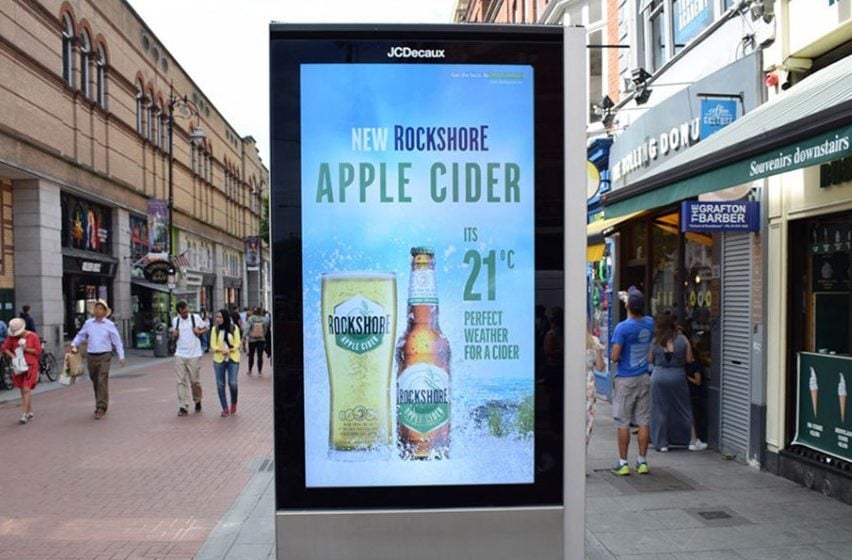
The destination: one strong image, short message, bold contrast — produced in minutes.
You don’t need all ten on day one. Sequence them:
Spec sheets for your booked inventory, the central asset library, and your first master-creative template for one live client.
Automated versioning on the master, the consolidated approval flow, and the pre-flight QA checklist in every job.
Dynamic templates for recurring formats, motion and copy standards trained into the team, and winner-reuse tracking in your reporting.
The balance that works: automation handles production logic; humans keep brand nuance and tone.
The Neuron’s free DOOH Design Studio is built for exactly this split — hundreds of vertical-specific templates crafted by DOOH experts, pre-sized to screen specs, with your client’s logo, message, fonts and colors applied in minutes. Finished creative uploads straight to the platform, so production and delivery live in one place.
Screens vary from portrait street panels to large-format landscape billboards. Build from a master layout and adapt to the top resolutions in your plan — your DSP lists exact specs per screen.
Fewer than you think if you systemize: one master concept, templated layouts per format, and dynamic fields for the elements that change (offer, location, time).
Often yes, as a starting point — but DOOH is glanceable, distant and silent. Strip copy down, raise contrast, and drop anything that needs sound or interaction.
Resizing, versioning and data-driven variations. Keep concepting and craft human — automation buys your designers time for the work that wins pitches.
Enter your work email and we’ll send the designed 8-page edition straight to your inbox — keep it, or share it with your team.
One field — that’s it. You’ll receive the eBook by email.
